Best USB-C memory card readers are not only about buying the fastest-looking accessory on the shelf. For photographers and videographers, the right reader can save time after a shoot, reduce transfer errors, and make large RAW photo folders, 4K clips, 8K footage, drone files, and action camera videos easier to manage.
The confusing part is that many readers look similar, but they do not perform the same way. A basic USB-C SD reader may be fine for casual photos, while a CFexpress Type B reader with USB4 can make a much bigger difference for professional video files. The card format, USB speed, cable quality, computer port, and storage drive all affect the final offloading speed.
A good reader should match the cards you actually use. Buying a premium CFexpress reader makes little sense if your camera records only to UHS-I SD cards. At the same time, using a cheap SD reader with UHS-II or V90 cards may limit the speed you paid for when buying professional media.
This guide explains how to choose a USB-C memory card reader in a practical way, which types are best for different photo and video workflows, what specifications matter, and which mistakes to avoid before spending money.
Instead of treating every reader as equal, the article separates the best choices by real use case: travel photography, wedding work, drone footage, studio offloading, high-resolution video, CFexpress workflows, mobile editing, and simple everyday backups.
Important note: memory card readers handle valuable files, so always copy footage to a reliable drive, confirm that the files open correctly, and avoid formatting the card until you have at least one verified backup. For paid shoots, professional productions, or client work, use a backup workflow instead of trusting a single transfer.
How to Choose the Best USB-C Memory Card Reader
The first step is to identify the card type used by your camera, drone, phone, action camera, or audio recorder. SD and microSD cards are common for hybrid cameras, drones, mirrorless bodies, action cameras, and portable recorders. CFexpress Type A and Type B cards are more common in high-end photo and video cameras that need faster sustained write speeds.
The second step is checking the speed class of the card. For SD cards, UHS-I, UHS-II, V30, V60, and V90 markings matter because they indicate whether the card is designed for basic shooting, high-bitrate video, or demanding professional recording. A reader that does not support the same bus type can still read the card, but it may not unlock the card’s best transfer speed.
The third step is checking the connection between the reader and the computer. USB-C describes the connector shape, not always the actual speed. A reader may use USB-C but still run at a slower USB standard. For SD cards, USB 3.2 Gen 1 or Gen 2 is usually enough. For CFexpress, especially Type B cards, USB 3.2 Gen 2, USB 3.2 Gen 2×2, Thunderbolt, or USB4 can make a bigger difference.
In practice, the best reader is the one that avoids the weakest link in your workflow. If your card is fast but your reader is slow, the transfer is slow. If your reader is fast but your computer port is limited, the transfer is also slow. If both are fast but you copy files to an old external hard drive, the drive may become the bottleneck.
| Card or workflow | Best reader type | Main thing to check |
|---|---|---|
| UHS-I SD cards | Basic USB-C SD reader | Reliable build and stable connection are more important than extreme speed. |
| UHS-II SD cards | USB-C UHS-II SD reader | Confirm UHS-II support, not only “SD compatible.” |
| microSD cards from drones or action cameras | USB-C microSD reader or dual SD/microSD reader | Avoid loose adapters if you transfer footage often. |
| CFexpress Type A | USB-C CFexpress Type A reader | Make sure it supports Type A, not Type B. |
| CFexpress Type B | USB-C, Thunderbolt, or USB4 CFexpress Type B reader | Choose faster interfaces for large video files and professional work. |
| Multi-camera shoots | Dock or multi-slot reader | Check whether simultaneous transfers reduce speed. |
Best USB-C Memory Card Readers by Use Case
The best USB-C memory card readers depend on what you shoot. A travel photographer may value size and durability. A wedding shooter may need two SD slots or a fast UHS-II reader. A filmmaker working with CFexpress cards may care more about thermal control and maximum sustained transfer speed than portability.
For most photographers using SD cards, a compact USB-C UHS-II SD reader is the safest all-around choice. It remains backward compatible with UHS-I cards while giving better performance with faster UHS-II cards. This is useful for RAW photo bursts, large event galleries, and video projects where hundreds of gigabytes may need to be moved after a shoot.
For drone pilots and action camera users, a dual SD and microSD reader is usually more practical than a single-slot reader. It reduces the need for fragile microSD-to-SD adapters and makes it easier to offload footage from multiple devices during travel. A reader with a short built-in cable can also be easier to use with laptops, tablets, and phones.
For CFexpress Type B users, the reader choice becomes more serious. These cards can be much faster than SD, but only if the reader and computer connection can keep up. A USB4 or Thunderbolt-compatible CFexpress Type B reader is ideal for professional users who regularly move very large 6K, 8K, RAW, or high-bitrate video files.
For Sony shooters using CFexpress Type A, a Type A reader is required. Type A and Type B are not interchangeable. Some readers support both CFexpress Type A and SD, which can be helpful because many Sony cameras use slots that support both card families depending on the model and recording mode.
| Best fit | Recommended reader style | Why it makes sense |
|---|---|---|
| Everyday photographers | Compact USB-C SD and microSD reader | Simple, portable, affordable, and enough for casual photo transfers. |
| Event and wedding photographers | USB-C UHS-II SD reader | Better for large RAW batches and fast turnaround after shoots. |
| Drone and action camera users | USB-C microSD reader with strong casing | Reduces adapter problems and handles small cards more safely. |
| Hybrid creators | Dual SD/microSD UHS-II reader | Works well for cameras, drones, recorders, and mobile setups. |
| Professional video shooters | USB-C CFexpress reader | Better suited for large video files and high-speed cards. |
| Studio teams | Docking reader or modular hub | Useful when multiple cards need to be copied and organized. |
| Mobile editors | USB-C reader compatible with tablets and phones | Allows quick review, backup, and file transfer without a laptop. |
SD, microSD, CFexpress Type A, and CFexpress Type B Explained
SD cards are still the most common option for photography and hybrid cameras. Many users only need a reliable SD reader, especially when working with JPEGs, moderate RAW files, or standard 4K video. However, if your card is UHS-II, you should choose a reader that also supports UHS-II to avoid unnecessary speed loss.
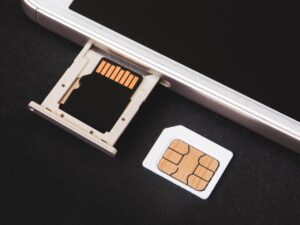
microSD cards are common in drones, action cameras, smartphones, handheld game devices, and small recorders. They are physically smaller and easier to misplace, so a reader with a secure slot is useful. For frequent drone work, a dedicated microSD reader is often safer than repeatedly using a loose SD adapter.
CFexpress Type A is smaller and is used in some high-end camera systems. It is not the same as CFexpress Type B. A common mistake is assuming that any CFexpress reader will work with any CFexpress card. Before buying, check the exact card type printed on the card and listed in the camera manual.
CFexpress Type B is physically larger and is widely used in professional cameras that record high-resolution video or large RAW bursts. These cards can move files very quickly, but they also generate heat during heavy transfers. A good CFexpress reader should have a solid body, proper heat management, and a cable that does not disconnect easily.
In many cases, creators own more than one card type. For example, a camera may use SD while a drone uses microSD, or a professional camera may use CFexpress for video and SD for backup. A multi-format reader can simplify the bag, but dedicated readers may still be faster and more reliable for heavy workloads.
- Check the exact card type printed on your memory card before buying a reader.
- Choose UHS-II support if your SD cards have a second row of contacts.
- Do not assume CFexpress Type A and Type B are compatible with the same reader.
- For drone footage, prefer a reader with a direct microSD slot instead of relying only on adapters.
- For professional video, check heat management and connection speed before choosing a reader.
Speed Factors That Actually Affect Photo and Video Offloading
Transfer speed is affected by more than the reader. The memory card, reader, cable, computer port, destination drive, operating system, file size, and card condition all matter. A fast reader cannot turn a slow card into a fast card, and a fast card cannot overcome a slow USB port.
For SD cards, real-world transfers are usually limited by the card class and reader support. UHS-II readers are useful for UHS-II cards because they can use the extra contact row. If you place a UHS-II card in a basic UHS-I reader, the card may still work, but the transfer will usually fall back to a slower mode.
For CFexpress, the interface matters more because the cards can be significantly faster. USB 3.2 Gen 2 readers may be enough for many users, but USB4 or Thunderbolt readers can be better for very large projects. The benefit is most visible when transferring hundreds of gigabytes from fast CFexpress cards to a fast SSD.
The destination drive is another common bottleneck. Copying from a fast CFexpress card to an old external hard drive may feel slow even with an excellent reader. For fast video offloading, an internal SSD or high-quality external SSD is usually a better destination than a mechanical hard drive.
File size also changes the experience. A folder with thousands of small photos may transfer differently from one large video file. Small files can add overhead because the system must process many separate items. Large video files often show the sustained speed of the card and reader more clearly.
| Bottleneck | What it looks like | What to check |
|---|---|---|
| Slow card | Transfers stay slow even with a good reader | Check card speed class and rated read speed. |
| Wrong reader type | UHS-II card performs like a basic SD card | Confirm UHS-II, CFexpress Type A, or CFexpress Type B support. |
| Slow USB port | Fast reader does not reach expected performance | Check the actual USB speed of the computer port. |
| Poor cable | Reader disconnects or transfers become unstable | Use the included cable or a certified high-speed cable. |
| Slow destination drive | Transfer starts fast but quickly drops | Copy to an SSD and leave enough free space. |
| Heat buildup | Speed drops during long CFexpress transfers | Use a reader with a solid thermal design. |
Step-by-Step Workflow for Safe and Fast Offloading
A good reader helps, but the workflow matters just as much. The safest approach is to copy, verify, back up, and only then format the card in the camera. This reduces the risk of losing important footage because of accidental deletion, incomplete transfers, or corrupted files.
-
Prepare the destination folder before inserting the card.
Create a clear folder name based on the project, camera, or shoot. This avoids mixing files from different cards and makes it easier to locate footage later.
-
Connect the reader directly to a reliable USB-C port.
Whenever possible, connect the reader directly to the computer or to a trusted powered hub. Avoid loose adapters during important transfers because they increase the chance of disconnection.
-
Copy files instead of moving them.
Copying keeps the original files on the card until you confirm that the transfer worked. Moving files can be risky because an interruption may leave you with an incomplete result.
-
Wait for the transfer to fully finish.
Do not remove the card as soon as the visible progress bar disappears. Give the system a moment to finish writing data, especially when working with external drives.
-
Open a few files before clearing the card.
Check sample photos and videos from the beginning, middle, and end of the card. This helps confirm that the folder contains usable files, not only file names.
-
Create a second backup for important projects.
For paid work or irreplaceable footage, copy the files to another drive or cloud storage before formatting the memory card.
-
Eject the card properly.
Use the operating system’s eject option before removing the card or unplugging the reader. This reduces the chance of file system problems.
-
Format the card in the camera after backup.
Once the files are verified and backed up, format the card in the device that will use it. This is usually safer than deleting files manually from a computer.
- Use project folders with clear names.
- Copy files before deleting anything from the card.
- Verify that photos and videos open correctly.
- Keep a second backup for client work or travel footage.
- Eject the card before removing the reader.
- Format the card in the camera, not randomly on the computer.
Common Mistakes When Buying a USB-C Card Reader
One common mistake is buying by connector only. USB-C is convenient, reversible, and widely used, but it does not automatically mean the reader is fast. A low-cost reader can have a USB-C plug and still deliver basic performance. Always check the supported USB speed and card standards.
Another mistake is ignoring UHS-II support. Many SD readers say they support SDXC or SDHC cards, but that does not mean they support UHS-II speeds. If your card has two rows of contacts and you bought it for fast video or burst photography, a UHS-II reader is usually worth it.
A third mistake is buying a multi-card reader when a dedicated reader would be better. Multi-card readers are convenient, but some inexpensive models share limited bandwidth across slots. For heavy CFexpress or UHS-II work, a dedicated reader may be faster, cooler, and more stable.
Some users also overlook cable quality. A detachable cable is useful because it can be replaced, but a poor cable may cause random disconnections. For professional shoots, keep a spare cable in the bag and avoid using unknown cables when transferring critical footage.
Finally, many people expect advertised maximum speeds in every situation. In real use, speeds depend on the card, reader, port, drive, file type, and heat. A reader can be excellent even if it does not reach the theoretical maximum printed on the box.
| Common mistake | Why it matters | Better approach |
|---|---|---|
| Choosing only by USB-C connector | The connector does not guarantee high speed. | Check the USB standard and supported card type. |
| Using a UHS-I reader with UHS-II cards | The reader may limit transfer performance. | Buy a UHS-II reader if you use UHS-II cards. |
| Buying the wrong CFexpress type | Type A and Type B are physically different. | Match the reader exactly to the card type. |
| Ignoring the destination drive | A slow drive can bottleneck the whole transfer. | Use an SSD for large video projects. |
| Removing the card without ejecting | This can increase the chance of file system errors. | Always eject before unplugging. |
What to Look for in Build Quality and Daily Use
Build quality matters because memory card readers are often used in real-world conditions: hotel rooms, studios, cars, airports, outdoor locations, and crowded event spaces. A reader that feels fine on a desk may be less practical when used in the field with limited space and valuable footage.
For travel, a compact reader with a short built-in cable can be convenient, but the cable should not feel fragile. For studio use, a slightly larger reader with a stable base may be better because it does not slide around when inserting cards. For CFexpress readers, metal construction can help with heat, although design quality matters more than material alone.
Card slot quality is also important. The card should insert smoothly and stay secure without forcing it. If the slot feels too tight, too loose, or poorly aligned, it may become annoying or risky over time. A damaged card slot can be more expensive than buying a better reader from the beginning.
LED indicators are useful when they are not excessive. A simple activity light can show that the reader is working, but you should still wait for the operating system to finish and eject the card properly. Never rely only on the light to decide when a transfer is complete.
For mobile creators, compatibility with tablets and phones can be a major advantage. However, mobile operating systems may handle file formats, power, and storage permissions differently from laptops. Before depending on a reader for travel, test it with your phone or tablet at home using real files.
- Choose a reader with a solid card slot that does not require force.
- Prefer a stable body for desk use and a compact body for travel.
- For CFexpress, consider readers with better heat handling.
- Keep the original high-speed cable if the reader includes one.
- Test phone or tablet compatibility before relying on it during a trip.
- Avoid very cheap unknown readers for paid or irreplaceable work.
When a Multi-Slot Reader Is Better Than a Single Reader
A multi-slot reader is useful when you use different devices in the same workflow. For example, a creator may shoot photos on an SD card, drone footage on microSD, and high-bitrate video on CFexpress. Carrying one reader may be simpler than carrying several small adapters.
Multi-slot readers also help in studio and team environments. If several cards need to be copied after a long shoot, a dock or multi-reader setup can help organize the process. The main benefit is not always raw speed; sometimes it is reducing clutter, saving time, and avoiding confusion between cards.
However, multi-slot readers can have limitations. Some models slow down when several cards are being accessed at the same time. Others support many card types but only at basic speeds. For professional jobs, it may be smarter to use a dedicated high-speed CFexpress reader plus a separate UHS-II SD reader instead of relying on one cheap all-in-one device.
In practice, a multi-slot reader is best for convenience, while a dedicated reader is best for maximum performance. If you mostly copy one card at a time, a dedicated reader can be cleaner and faster. If you manage multiple cameras, drones, and accessories, a multi-slot reader can reduce friction.
Before choosing, think about the entire shoot day. If you often come home with six cards from different devices, convenience may matter more than benchmark numbers. If you usually transfer one large CFexpress card full of video, performance and cooling should matter more.
| Reader setup | Best for | Limitation |
|---|---|---|
| Single SD reader | Photographers using one camera system | Not useful for microSD or CFexpress without another reader. |
| Dual SD/microSD reader | Hybrid creators, drone users, action camera users | Usually not enough for CFexpress workflows. |
| Dedicated CFexpress reader | Professional video and high-speed photo work | Only supports one CFexpress type unless clearly stated. |
| Multi-slot reader | Travel and mixed-device setups | May not deliver top speed on every slot. |
| Docking station or modular hub | Studios, editors, and production teams | More expensive and less portable. |
When to Contact Support or Check Official Information
You should check the camera manual, memory card documentation, reader specifications, or manufacturer support when you are unsure about compatibility. This is especially important with CFexpress, UHS-II, SD Express, and high-bitrate video modes because small specification differences can affect whether a workflow is stable.
If a reader disconnects during transfers, becomes unusually hot, fails to mount cards, or corrupts files repeatedly, stop using it for important work until the cause is clear. The issue may be the reader, cable, USB port, card, operating system, or destination drive. Testing one variable at a time is safer than continuing to transfer valuable files through an unstable setup.
For professional work, contact the reader manufacturer if the product behaves differently from its official specifications. If a memory card repeatedly fails, check the card manufacturer’s support resources and warranty process. Do not keep using a card that shows repeated errors just because it works sometimes.
When a camera requires a specific card speed for certain video modes, trust the camera manufacturer’s guidance first. A card or reader may be technically compatible for basic file transfer but still not ideal for the recording format you use. This matters with high-resolution, high-frame-rate, or RAW video modes.
For data recovery situations, avoid formatting, repairing, or writing new files to the card. If the files are important, disconnect the card and consider professional recovery help. Continuing to use the card can reduce the chance of recovering lost footage.
Conclusion
Best USB-C memory card readers should be chosen by workflow, not by appearance. For most photographers, a reliable UHS-II SD or dual SD/microSD reader is the most practical option. For professional video creators using CFexpress, a faster USB-C, Thunderbolt, or USB4 reader can save meaningful time when moving large projects.
The safest choice is the reader that matches your card type, computer port, and destination drive. A fast card needs a compatible reader, a fast reader needs a capable USB-C port, and the final transfer still depends on where the files are being copied. Checking these details before buying helps avoid disappointment.
If you shoot paid work, travel footage, weddings, documentaries, or any project that cannot be repeated, treat the reader as part of your backup system. Copy files carefully, verify them, keep at least one backup, and contact official support when compatibility or reliability problems appear.
FAQ
1. Do I need a USB-C memory card reader if my laptop already has an SD slot?
You may not need one for casual transfers, but a USB-C reader can still be useful. Many built-in laptop SD slots are not as fast as dedicated UHS-II readers, and some laptops do not support the full speed of professional cards. A separate reader also gives you more flexibility when using tablets, desktops, hubs, or devices without an SD slot. If you only transfer occasional photos from a basic SD card, the built-in slot may be enough. If you transfer large RAW folders or video files often, a dedicated reader is usually more practical.
2. Is USB-C always faster than USB-A for memory card readers?
No. USB-C is the connector shape, not a guaranteed speed rating. A USB-C reader can be slow if it uses an older USB standard internally, while a USB-A reader can be fast if it supports a better USB interface. The important detail is the actual data standard, such as USB 3.2 Gen 1, USB 3.2 Gen 2, Thunderbolt, or USB4. USB-C is still convenient because modern laptops, tablets, and phones use it widely, but you should always check the listed transfer specification before buying.
3. What is the best USB-C reader for photographers using SD cards?
For photographers using SD cards, the best general choice is a USB-C UHS-II SD reader. It works with many SD cards and can take advantage of faster UHS-II cards when used with a compatible computer and storage drive. This type of reader is especially useful for RAW photography, weddings, events, sports, wildlife, and travel shoots where many files need to be copied quickly. If you only use basic UHS-I cards, a simpler reader can work, but UHS-II support gives more room for future upgrades.
4. What is the best reader for drone and action camera footage?
For drones and action cameras, a USB-C microSD reader or a dual SD/microSD reader is usually best. These devices commonly record to microSD cards, and using a direct microSD slot avoids relying on small adapters that can get lost or worn out. Look for a reader with a firm slot, compact body, and good compatibility with laptops or tablets. If you record high-bitrate 4K video, also check that the card and reader can sustain the transfer speed you expect during offloading.
5. Do I need a CFexpress reader for a CFexpress card?
Yes. CFexpress cards require a compatible CFexpress reader, and you must match the exact type. CFexpress Type A and CFexpress Type B are not the same size and do not fit the same slot unless the reader specifically supports that format. Professional cameras often use CFexpress because the cards can handle demanding photo and video workflows. For best results, use a reader designed for your card type and connect it to a fast USB-C, Thunderbolt, or USB4 port when moving very large files.
6. Why is my fast card reader transferring files slowly?
Slow transfers can happen for several reasons. The memory card may be slower than expected, the reader may not support the card’s fastest mode, the USB-C port may be limited, the cable may be poor, or the destination drive may be too slow. Heat can also reduce speed during long transfers, especially with CFexpress cards. To diagnose the problem, test one variable at a time: use another cable, another port, another card, and a fast SSD destination. This usually reveals the bottleneck.
7. Is a multi-slot reader better than separate card readers?
A multi-slot reader is better for convenience, but separate readers can be better for performance. If you use SD, microSD, and CFexpress cards in the same workflow, a multi-slot reader can reduce clutter and make travel easier. However, cheaper multi-slot readers may share bandwidth or support some card types only at basic speeds. For serious video work, a dedicated CFexpress reader and a dedicated UHS-II SD reader can be more reliable. The right choice depends on whether speed or simplicity matters more to your workflow.
8. Can I use a USB-C card reader with a phone or tablet?
Many USB-C card readers can work with phones and tablets, but compatibility depends on the device, operating system, file format, power needs, and app support. Some tablets handle camera files easily, while some phones may need a file manager app or may not recognize every format. Large video files can also be harder to manage on mobile devices with limited storage. Before relying on a reader during travel, test it at home with the same cards, file types, and device you plan to use.
9. Should I buy the fastest reader available?
Not always. The fastest reader is only useful if your card, computer port, cable, and destination drive can also support high speeds. For basic SD cards, an expensive high-end reader may not make transfers noticeably faster. For CFexpress cards and large video projects, a faster reader can save time. A practical approach is to buy enough speed for your actual card type and workload. Spend more when the reader removes a real bottleneck, not just because the advertised number looks impressive.
10. What is UHS-II, and why does it matter for SD readers?
UHS-II is a faster SD card interface that uses an extra row of contacts on the card. If you have UHS-II SD cards, a UHS-II reader can help you get better transfer performance than a basic reader. This matters for photographers and videographers who move large RAW folders, high-resolution images, or video files. A UHS-II card can still work in many UHS-I readers, but it may operate at a slower speed. To benefit from the card, the reader and device should support the same standard.
11. Can a bad card reader corrupt files?
A faulty or unstable reader can contribute to transfer problems, especially if it disconnects during copying or has a poor card slot. File corruption can also be caused by damaged cards, bad cables, failing drives, sudden power loss, or removing the card without ejecting it. If you notice repeated errors with the same reader, stop using it for important files until you test it. For valuable work, copy files, verify that they open, create a backup, and only then format the card in the camera.
12. How many backups should I make after offloading a memory card?
For casual photos, one verified copy may be enough for some users, although a second backup is still safer. For client work, travel, weddings, commercial shoots, or irreplaceable footage, keep at least two copies before formatting the card. A common approach is one working copy on an SSD and one backup on another drive or secure cloud storage. The memory card should not be treated as the only backup after a shoot. Verify the files before clearing the card to avoid discovering problems too late.
Editorial note: This article is educational and intended to help readers compare memory card reader features more safely. Product availability, specifications, and compatibility can change, so confirm details with the reader, card, camera, and computer manufacturer before buying equipment for important photo or video work.
Official References
- USB-IF — USB4 specification overview
- SD Association — Speed Class standards for video recording
- Kingston — Memory card readers for SD and microSD cards

Marcus Hale is the founder of Priwoo StorageLab and a long-time camera storage enthusiast. After losing a full shoot to a corrupted card, he became obsessed with understanding how memory media really works. He now spends his time testing cards, breaking down storage specs, and helping photographers and videographers avoid data loss.