SD card speed classes are the small symbols printed on memory cards that tell you the minimum sustained writing performance the card is designed to provide. For video work, the most important modern markings are usually V30, V60 and V90, because they describe whether a card can keep writing data fast enough during continuous recording.
The key idea is simple: the number after the letter V refers to minimum sustained sequential write speed in megabytes per second. A V30 card is rated for at least 30 MB/s, a V60 card for at least 60 MB/s and a V90 card for at least 90 MB/s under the defined standard conditions.
This matters because video recording is not the same as copying a few photos to a computer. A camera needs the card to keep accepting data without long pauses. If the card cannot maintain the required write speed, the camera may stop recording, show an error, drop frames or limit some video modes.
Many beginners choose SD cards only by capacity or the large read speed printed on the package, such as 170 MB/s or 300 MB/s. That number can be useful for transferring files to a computer, but it does not always tell you whether the card is safe for a demanding video setting. For recording, sustained write performance is usually more important.
This guide explains what V30, V60 and V90 really mean, how they compare with older symbols like C10 and U3, when each class makes sense and what to check before buying a card for cameras, drones, action cameras or audio-video gear.
Important note: before buying an SD card for professional recording, always check your camera manual or manufacturer support page. A card can have a high speed rating and still be unsuitable if the device does not support the required card type, bus interface, capacity format or recording mode.
What Video Speed Class Means on an SD Card
Video Speed Class is a rating system created to help users identify SD cards that can maintain a minimum sequential write speed during video recording. It was designed for modern recording needs such as high-bitrate Full HD, 4K, 6K, 8K, 360-degree video and professional camera workflows.
The letter V stands for Video Speed Class. The number after it represents the minimum sustained write speed in MB/s. This is why V30, V60 and V90 are easier to understand than many older card symbols: the number directly points to the minimum write speed the card is expected to sustain.
In practice, this does not mean the card will always write at exactly that speed. A V60 card, for example, may be advertised with faster maximum speeds. The V60 rating simply tells you the minimum class level it is designed to meet for continuous sequential writing under the standard. That minimum is what matters when the camera is recording without interruption.
| Video Speed Class | Minimum Sustained Write Speed | Common Practical Use |
|---|---|---|
| V30 | 30 MB/s | Many 4K modes, high-quality Full HD, drones and action cameras |
| V60 | 60 MB/s | Higher-bitrate 4K, some 6K modes and advanced mirrorless cameras |
| V90 | 90 MB/s | Very high-bitrate 4K, 6K, 8K and professional video recording |
A useful way to think about it is this: V30 is often the practical baseline for many modern 4K users, V60 is a safer middle ground for demanding cameras, and V90 is mainly for workflows where the camera manual specifically requires very high sustained write performance.
Why V30, V60 and V90 Are About Write Speed, Not Just General Speed
One of the most common mistakes is confusing read speed with write speed. Read speed affects how quickly you can move files from the card to a computer. Write speed affects how safely the camera can save data to the card while recording or shooting bursts.
Many SD cards advertise a large number on the front, such as maximum read speed. That number can look impressive, but it may not represent the card’s minimum recording performance. A card with a high read speed and weak sustained write speed may still fail in a demanding video mode.
Video recording needs consistency. A camera does not only need a short burst of speed; it needs the card to keep up for minutes or hours. If the data rate rises above what the card can reliably sustain, the camera may stop recording even if the card looks fast on paper.
| Speed Term | What It Means | Why It Matters |
|---|---|---|
| Read speed | How fast data can be copied from the card | Useful for transferring footage to a computer |
| Write speed | How fast data can be saved to the card | Critical for video recording and photo bursts |
| Minimum sustained write speed | The lowest continuous writing performance guaranteed by the class | Helps prevent recording errors in supported devices |
| Maximum advertised speed | A best-case or peak performance figure | Useful, but not enough by itself for choosing a video card |
Before choosing a card, look for the Video Speed Class symbol and compare it with the recording requirements listed by your camera. This is more reliable than choosing only by the biggest number printed on the package.
How V30, V60 and V90 Compare With C10, U1 and U3
Older SD cards often show symbols such as C10, U1 or U3. These are also speed class markings, but they belong to earlier rating systems. They can still be useful, but they do not replace the Video Speed Class rating when you are choosing a card for modern video work.
C10 means Class 10 and refers to a minimum sustained write speed of 10 MB/s. U1 also indicates 10 MB/s, while U3 indicates 30 MB/s. This is why many V30 cards also show U3: both point to a 30 MB/s minimum class level, although they belong to different class systems.
The important detail is that symbols should be matched with the device’s requirements. If a camera manual says V60, buying a card marked only U3 may not be enough, even though U3 and V30 share the same 30 MB/s minimum figure. The safest choice is to follow the exact class type requested by the device maker.
| Symbol | Minimum Write Speed | Best Way to Interpret It |
|---|---|---|
| C10 | 10 MB/s | Older baseline for HD video and general use |
| U1 | 10 MB/s | UHS Speed Class entry level |
| U3 | 30 MB/s | Often seen on cards suitable for many 4K modes |
| V30 | 30 MB/s | Video Speed Class rating for many modern video devices |
| V60 | 60 MB/s | Higher sustained write class for demanding video |
| V90 | 90 MB/s | High-end rating for professional recording needs |
In many cases, the card will show several markings at the same time. That is normal. The practical move is to focus on the marking your device specifically asks for, especially when recording at high resolution, high frame rate or high bitrate.
When a V30 SD Card Is Enough
A V30 SD card is often enough for everyday creators, travel videos, many mirrorless cameras, drones, action cameras and standard 4K recording modes. It gives a clear 30 MB/s minimum sustained write rating, which is far above what older Class 10 cards were designed to guarantee.
For many users, V30 is the best balance between price, performance and availability. It is usually easier to find than V60 or V90, and it often costs less. If your camera manual lists V30 or U3 as the requirement for the video mode you use, a good-quality V30 card from a reliable brand can be a practical choice.
The limitation appears when the camera records at very high bitrates or uses advanced formats that generate more data every second. Some cameras allow basic 4K recording on V30 but require V60 or V90 for 4K All-Intra, 6K, 8K, RAW video or high-frame-rate settings.
- Choose V30 when your camera manual lists V30, U3 or 30 MB/s as enough for your selected recording mode.
- Use V30 for general 4K only after confirming the bitrate and codec requirements of your device.
- Avoid assuming every V30 card is ideal for professional video just because it says 4K on the package.
- Check whether your device supports SDHC, SDXC or SDUC before buying high-capacity cards.
- Buy from reliable retailers to reduce the risk of counterfeit cards.
A common real-world issue happens when someone buys a V30 card for a camera that records low-bitrate 4K without problems, then later switches to a higher-quality internal recording mode and suddenly sees recording errors. The card did not necessarily become defective; the selected mode may simply require more sustained write speed.
When You Should Move Up to V60
V60 cards are designed for users who need more sustained write performance than V30 can guarantee, but who may not need the highest cost and speed level of V90. This makes V60 a strong choice for many serious video creators using high-bitrate 4K, 10-bit recording or certain 6K modes.
In practice, V60 often becomes important when the camera produces large files continuously. Higher frame rates, less compressed codecs and advanced color settings can increase the data rate. Even if the resolution looks the same, one 4K mode may be much heavier than another 4K mode.
Another reason to choose V60 is margin. If your camera’s requirement is near the limit of V30, moving to V60 can provide a safer class level, assuming the device supports the card type and bus interface. This does not mean every user should overpay, but it can reduce problems in demanding workflows.
| Recording Situation | Why V60 May Help | What to Confirm First |
|---|---|---|
| High-bitrate 4K | Needs more stable sustained writing than basic 4K | Camera bitrate and supported card list |
| 10-bit internal recording | Can generate larger files than standard 8-bit recording | Codec and recording mode requirements |
| Long recording sessions | Consistency matters more as recording time increases | Heat, battery and file system limits |
| Hybrid photo and video use | Helps with demanding video and faster still-photo bursts | Actual write speed and device compatibility |
V60 is often the sensible upgrade when V30 works for some modes but blocks others. Before spending more, read the manual carefully. Camera manufacturers often publish tables showing which card class is required for each resolution, frame rate and codec combination.
When V90 Is Worth the Extra Cost
V90 cards are high-end SD cards aimed at demanding video workflows. They are rated for at least 90 MB/s sustained sequential write speed, which can be necessary for advanced internal recording modes in professional cameras.
The main reason to buy V90 is not prestige. It is compatibility with demanding modes that explicitly require it. Some cameras may require V90 for the highest-quality 4K All-Intra, high-frame-rate recording, 6K, 8K or internal RAW-like workflows. In those cases, a cheaper card may not unlock the mode or may stop recording unexpectedly.
However, V90 can be unnecessary for many users. If your device records only standard Full HD or moderate-bitrate 4K, paying for V90 may not improve image quality. The card does not make the camera record better video by itself; it only provides the required storage performance when the camera needs it.
- Buy V90 when the camera manual specifically requires V90 for the mode you plan to use.
- Check that your device supports the bus interface needed to benefit from high-end SD cards.
- Do not choose V90 only because the card has the highest number on the shelf.
- For paid work, keep at least one tested backup card from a reliable brand.
- Test the card in the actual camera before using it for an important shoot.
For professional use, the cost of V90 can be easier to justify because failed footage is more expensive than the card. For casual use, the better purchase may be a reliable V30 or V60 card with enough capacity and good compatibility.
Step-by-Step: How to Choose the Right SD Card Speed Class
Choosing the right SD card is easier when you start with the device instead of the card. The card’s rating only matters if it matches what your camera, drone, recorder or reader can actually use.
-
Check the device manual first.
Look for the recording mode you plan to use and find the required SD card class. This matters because one device may accept V30 for basic 4K but require V60 or V90 for higher-bitrate modes. Avoid choosing only by brand or capacity.
-
Identify the exact video settings you use.
Resolution, frame rate, bitrate, codec and color depth all affect storage demand. A 4K 24 fps mode may be much lighter than 4K 120 fps or 4K All-Intra. Choose the card for the heaviest mode you actually need.
-
Match the Video Speed Class symbol.
If the manual says V30, choose V30 or higher. If it says V60, do not assume U3 is enough. Matching the same class type is safer because the device maker tested or specified that requirement for a reason.
-
Confirm the card format and capacity type.
Make sure your device supports SDHC, SDXC or SDUC as needed. Older devices may not support large-capacity SDXC cards, even if the speed rating looks correct. Capacity compatibility is separate from speed class.
-
Check the bus interface.
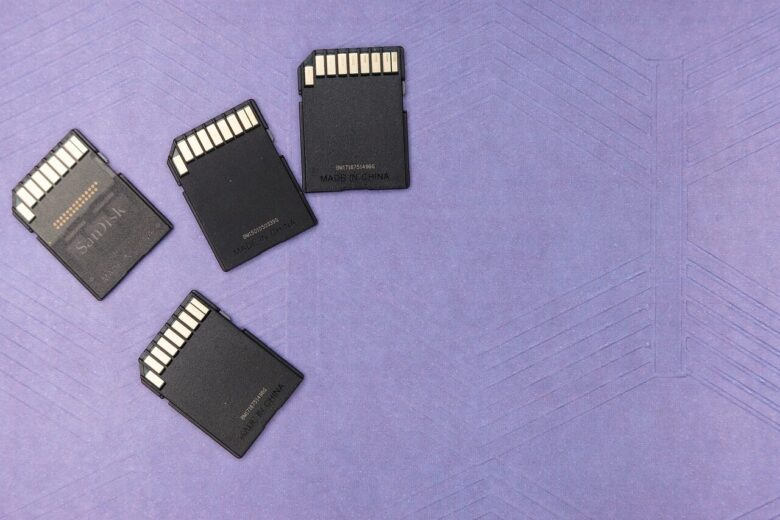
Some high-speed cards use UHS-II, which has an extra row of contacts. A UHS-II card may still work in a UHS-I device, but it may not deliver its full potential. This is especially important when paying for V60 or V90.
-
Buy from a trustworthy source.
Counterfeit memory cards are a real problem. A fake card may show a known brand and high speed rating but fail under real recording. Purchase from reliable retailers and avoid deals that look unusually cheap.
-
Test before important use.
Record with your intended settings for longer than you expect to shoot. Then play back the footage and transfer the files. This simple test can reveal problems before a paid job, trip or important event.
This process prevents the most common buying mistake: choosing a card because it looks fast, without confirming whether it is the right kind of fast for the device and recording mode.
Common Mistakes That Cause Recording Problems
Many SD card problems are not caused by the card being completely bad. They often come from choosing the wrong rating, using a card in an unsupported device, buying from an unreliable source or reusing a heavily fragmented card without formatting it properly.
One frequent mistake is choosing a card based on maximum read speed. That number can help when transferring files, but it does not guarantee stable recording. Another mistake is assuming that all 4K recording has the same storage requirement. In reality, bitrate and codec can change the required write speed dramatically.
It is also common to ignore the camera’s approved card list. Some manufacturers test specific models and publish recommendations. If you are recording important work, those lists are worth checking because they reduce guesswork.
| Common Mistake | Possible Consequence | Better Approach |
|---|---|---|
| Buying only by capacity | The card may be large but too slow for video | Check speed class and device requirements |
| Trusting only maximum read speed | Recording may fail even if file transfer is fast | Look for sustained write ratings like V30, V60 or V90 |
| Using an old card for new camera modes | The camera may stop recording or block settings | Match the card to the selected recording mode |
| Buying suspiciously cheap cards | Risk of counterfeit capacity or fake speed ratings | Use trusted retailers and test the card |
| Never formatting the card correctly | Fragmentation or file system issues may reduce reliability | Back up files and format using the camera or official formatter |
A practical habit is to label cards by purpose. For example, keep one group for casual photos, another for normal 4K and another for high-bitrate recording. This reduces the chance of putting a slower card into the camera during an important shoot.
When to Format, Replace or Get Support
Formatting can help when a card has been used heavily, moved between devices or filled and deleted many times. Repeated deleting and rewriting can contribute to fragmented storage areas, which may affect recording behavior. Before formatting, always back up the files because formatting removes access to the stored data.
For best results, format the card in the camera that will use it or use the official SD Memory Card Formatter from the SD Association when working on a computer. General operating system formatting tools may work, but they may not always be optimized for SD, SDHC, SDXC or SDUC cards.
You should consider replacing the card if errors repeat after formatting, if the card becomes unusually slow, if files become corrupted or if the card has been used for years in demanding recording. Memory cards are consumable storage, not permanent archives.
- Back up all files before formatting any SD card.
- Format the card in the camera when preparing it for camera use.
- Use the official SD Memory Card Formatter when formatting on a computer.
- Stop using a card that repeatedly causes corrupted files or recording failures.
- Contact the camera or card manufacturer if errors continue with a compatible card.
Professional support is worth seeking when the card contains important lost footage, when several compatible cards fail in the same device or when a camera rejects cards that should meet its published requirements. In those cases, the problem may involve the device firmware, card reader, slot damage or a deeper storage issue.
Quick Buying Guide for Different Users
The best SD card speed class depends on what you record. A casual user does not need the same card as a wedding filmmaker, and a drone pilot may have different needs from someone shooting high-bitrate cinema footage.
For everyday use, V30 is often the most practical starting point. For serious hybrid creators and higher-bitrate video, V60 is often a safer option. For professional cameras that specifically require it, V90 is the correct choice even if it costs more.
| User Type | Suggested Starting Point | Reason |
|---|---|---|
| Casual photos and Full HD video | C10, U1, U3 or V30 depending on device | Many basic modes do not need V60 or V90 |
| General 4K creator | V30 | Good balance for many 4K cameras and drones |
| Advanced mirrorless video user | V60 | More headroom for higher-bitrate recording |
| Professional high-bitrate video | V90 if required by the camera | Designed for very demanding sustained write needs |
| Long paid shoots | Manufacturer-approved V60 or V90 | Reliability and tested compatibility matter more than saving a little money |
When unsure, do not guess from the front of the card alone. Search for your exact camera model and recording mode, then compare the requirement with the card’s printed symbols and product specifications.
Conclusion
SD card speed classes make more sense when you focus on minimum sustained write speed. V30 means at least 30 MB/s, V60 means at least 60 MB/s and V90 means at least 90 MB/s for the Video Speed Class rating. These markings are especially important for video because recording needs steady writing, not just fast file transfers.
For many people, V30 is enough for common 4K recording, while V60 is better for higher-bitrate work and V90 is mainly for demanding professional modes that specifically require it. The safest choice is always the one that matches your camera manual, selected video settings and supported card type.
Before buying, compare the speed class, capacity format, bus interface, brand reliability and your device’s official requirements. If recording errors continue after using a compatible card and formatting it correctly, contact the camera or card manufacturer for support before trusting the setup on important work.
FAQ
1. What does V30 mean on an SD card?
V30 means the card is rated for a minimum sustained sequential write speed of 30 MB/s under the Video Speed Class system. This rating is mainly useful for video recording because cameras need the card to keep accepting data continuously. A V30 card may advertise higher maximum read or write speeds, but the V30 symbol tells you the minimum class level. It is commonly used for many 4K cameras, drones and action cameras, but you should still check your device manual before relying on it.
2. Is V60 always better than V30?
V60 is faster as a Video Speed Class rating because it guarantees a higher minimum sustained write speed: 60 MB/s instead of 30 MB/s. However, it is not always the better purchase for every user. If your camera only requires V30 for the recording modes you use, a reliable V30 card may work perfectly. V60 becomes useful when your camera records higher-bitrate video, advanced codecs, 10-bit footage or modes that specifically request V60. The best card is the one that matches your device and workflow.
3. When do I need a V90 SD card?
You usually need a V90 SD card when your camera manual specifically requires V90 for a demanding recording mode. This can include very high-bitrate 4K, 6K, 8K, All-Intra recording, high frame rates or advanced professional formats. V90 cards are more expensive, so they are not necessary for basic photos, Full HD or many standard 4K modes. If your device does not need that level of sustained writing, a V30 or V60 card may be a better value.
4. Does a faster SD card improve video quality?
A faster SD card does not improve image quality by itself. Video quality comes from the camera, lens, sensor, codec, bitrate and settings. The SD card’s job is to store the data reliably. A faster card may unlock certain high-quality recording modes if the camera requires that speed, but it will not make a low-bitrate mode look better on its own. Think of the card as a compatibility and reliability part, not as an image enhancement tool.
5. What is more important for recording, read speed or write speed?
Write speed is more important for recording because the camera must save data to the card while filming. Read speed is useful later, when you transfer files from the card to a computer. Many cards advertise high read speeds on the front of the package, but that number alone does not prove the card can handle demanding recording. For video, look at sustained write ratings such as V30, V60 or V90 and compare them with the device requirements.
6. Can I use a V90 card in a camera that only needs V30?
In many cases, yes, a V90 card can be used in a device that only requires V30, as long as the card type, capacity and bus interface are compatible. However, the camera may not benefit from the extra speed if it cannot use it. You may also pay much more without seeing a practical difference. This can still make sense if you use the same card across several cameras, but for one basic device, matching the recommended class is usually more cost-effective.
7. Why does my camera stop recording even with a fast SD card?
A camera may stop recording for several reasons even if the card looks fast. The card may not meet the exact Video Speed Class required, it may be counterfeit, it may be fragmented, it may be too hot, or the selected recording mode may require a higher class than expected. The device may also have firmware limitations or capacity compatibility issues. Back up your files, format the card correctly, test another approved card and check the camera manual for the exact mode requirements.
8. Is U3 the same as V30?
U3 and V30 both indicate a 30 MB/s minimum write speed class level, but they belong to different speed class systems. Many cards show both symbols, and in many consumer situations they appear together. However, if your camera manual asks for V30, it is safer to choose a card that clearly shows V30 rather than assuming a different symbol is enough. Device makers may specify a particular class type because of how the card and host are expected to work together.
9. Do I need V30, V60 or V90 for photos?
For single photos, Video Speed Class is usually less important than it is for video. However, write speed can still matter for burst shooting, especially with high-resolution RAW files. A faster card can clear the camera buffer more quickly, allowing longer bursts or shorter waiting time between shots. If you mostly take casual photos, V30 may be more than enough. If you shoot sports, wildlife or large RAW bursts professionally, check your camera’s recommended cards and real write performance.
10. Can a microSD card have V30, V60 or V90 ratings?
Yes, microSD cards can carry Video Speed Class ratings, including V30 and sometimes higher classes depending on the model. The same basic meaning applies: the V number represents minimum sustained sequential write speed in MB/s. This is useful for drones, action cameras, smartphones, handheld consoles and small cameras. The main caution is compatibility. Always check whether your device supports the card capacity and speed class, and use a quality adapter only when a full-size SD slot is involved.
11. Should I format my SD card before using it?
It is a good practice to format a card before using it in a camera, especially if it was previously used in another device. Formatting prepares the file system and can reduce issues caused by old files or fragmented storage areas. Always back up your files first because formatting removes access to the stored data. For camera use, formatting inside the camera is usually recommended. For computer formatting, the SD Association provides an official formatter designed for SD memory cards.
12. How can I avoid buying a fake SD card?
Buy from trusted retailers, avoid prices that look unrealistically low and check the packaging carefully. Counterfeit cards may display famous brand names, large capacities and high speed classes while failing in real use. After buying, test the card by filling it with data, recording in your camera’s intended mode and verifying the files. If the capacity appears wrong, files become corrupted or recording fails quickly, stop using the card and contact the seller or manufacturer support.
Editorial note: This article is for educational purposes and is intended to help readers understand SD card speed markings before buying or using memory cards. For critical recording work, always confirm requirements in the official manual or support page for your specific camera, drone, recorder or card model.
Official References
- SD Association — Speed Class
- SD Association — Bus Speed Standards
- SD Association — SD Memory Card Formatter

Marcus Hale is the founder of Priwoo StorageLab and a long-time camera storage enthusiast. After losing a full shoot to a corrupted card, he became obsessed with understanding how memory media really works. He now spends his time testing cards, breaking down storage specs, and helping photographers and videographers avoid data loss.