UHS-I vs UHS-II is one of the most common questions people face when buying an SD or microSD card for cameras, drones, recorders, handheld consoles, laptops, and card readers. The simple answer is that UHS-II can be much faster, but many users do not actually need that extra speed unless their device and workflow can use it.
The confusing part is that memory card packaging often shows several speed marks at once. You may see UHS-I, UHS-II, U1, U3, V30, V60, V90, A1, A2, and large read speed numbers on the same package. These labels do not all mean the same thing, and choosing only by the biggest number can lead to wasted money.
In practice, UHS-I is enough for many everyday users, including people shooting photos, recording standard 4K video at moderate bitrates, storing files, or using a card in devices that only support UHS-I. UHS-II becomes more useful when you need faster burst clearing, higher-bitrate video, quicker file transfers, or a professional workflow where time matters.
The key is not asking which card is “best” in general. The better question is whether your device, recording format, card reader, and budget can actually benefit from UHS-II. A fast UHS-II card placed in a UHS-I-only device usually works, but it will normally operate closer to UHS-I limits.
This guide explains the difference in simple terms, shows when the upgrade is worth it, and helps you avoid paying for speed you will not feel in real use.
Important note: before buying a memory card, check your device manual or manufacturer support page. SD card speed depends on both the card and the host device, so a faster card does not guarantee faster performance in every camera, drone, console, phone, laptop, or reader.
UHS-I vs UHS-II: What the Difference Really Means
UHS stands for Ultra High Speed, a bus interface used by SDHC, SDXC, and SDUC memory cards. In simple terms, the bus is the path used to move data between the memory card and the device. UHS-I uses one row of pins, while UHS-II adds a second row of pins for faster communication.
The official SD Association overview lists UHS-I bus speeds up to 104MB/s and UHS-II bus speeds up to 312MB/s in half-duplex mode. These are bus interface limits, not guaranteed real-world speeds from every card. A card can have a fast interface but still deliver lower sustained write performance depending on its internal memory, controller, capacity, temperature, and workload.
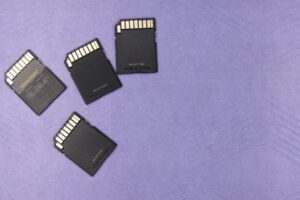
The easiest visual difference is on the back of a full-size SD card. A UHS-I card has one row of contacts. A UHS-II card has two rows. On microSD cards, the same idea applies, but the contacts are smaller. If your device does not have the second row interface, it cannot fully use UHS-II speed.
| Feature | UHS-I | UHS-II |
|---|---|---|
| Physical contacts | One row of pins | Two rows of pins |
| Official bus speed ceiling | Up to 104MB/s | Up to 312MB/s |
| Typical price | Usually cheaper | Usually more expensive |
| Best fit | Everyday photos, many 4K modes, file storage, casual use | High-bitrate video, long bursts, professional cameras, fast transfers |
| Main limitation | Can slow down demanding workflows | Requires compatible device and reader to feel the benefit |
One practical mistake is treating UHS-I and UHS-II as the same thing as U1, U3, V30, or V90. They are related to speed, but they describe different parts of performance. UHS-I and UHS-II describe the bus interface. Speed class marks describe minimum sustained performance for recording or other sequential work.
Bus Speed Is Not the Same as Write Speed
The large number printed on a memory card package often refers to read speed under ideal conditions. Read speed matters when copying photos and videos from the card to a computer, but it is not the only number that matters during recording. When a camera is saving video or clearing a burst, write speed is usually more important.
For example, a UHS-I card may advertise a high read speed, but its sustained write speed may be much lower. A UHS-II card may advertise very high read and write speeds, but the real benefit appears only when the host device and card reader support UHS-II. This is why two cards with similar-looking labels can behave very differently in a real camera.
Speed class marks help reduce confusion. U1 generally indicates a minimum sustained write speed of 10MB/s, while U3 indicates 30MB/s. Video Speed Class marks such as V30, V60, and V90 are especially useful for video because they identify minimum sustained write performance levels designed for recording workflows.
| Mark on the Card | What It Usually Tells You | Why It Matters |
|---|---|---|
| UHS-I or UHS-II | The bus interface used by the card | Shows the potential connection speed between card and device |
| U1 | Minimum sustained write speed of 10MB/s | Useful for basic recording needs |
| U3 | Minimum sustained write speed of 30MB/s | Common recommendation for many 4K devices |
| V30 | Minimum sustained write speed of 30MB/s | Often suitable for common 4K recording modes |
| V60 | Minimum sustained write speed of 60MB/s | Useful for higher-bitrate video and some professional cameras |
| V90 | Minimum sustained write speed of 90MB/s | Used for demanding video formats and high-end workflows |
In many cases, a good UHS-I V30 card is more useful than a random UHS-II card with unclear sustained write performance. The safe approach is to match the card to the recording requirement listed by your device manufacturer, not just the most impressive marketing number.
When UHS-I Is More Than Enough
UHS-I is still a very practical choice for many users. It is widely supported, usually affordable, and available in large capacities. For everyday photography, document storage, music libraries, casual video, dash cams, older cameras, handheld gaming devices, and many action cameras, UHS-I often gives the best balance between price and performance.
If your device only supports UHS-I, buying UHS-II usually does not unlock UHS-II speed. The card may still work because UHS-II cards are designed to remain compatible with slower modes, but the device will not use the second row of contacts for full UHS-II performance. This is one of the most common reasons people buy expensive cards and then feel no difference.
UHS-I can also be enough for 4K video if the bitrate is not too high and the card has the correct speed class. Many devices ask for U3 or V30 rather than UHS-II specifically. In that situation, a reliable UHS-I V30 card from a reputable brand may be the smarter purchase.
- Choose UHS-I if your device manual only lists UHS-I support.
- Choose UHS-I if you mainly shoot JPEG photos, casual RAW photos, or standard 4K video.
- Choose UHS-I if you prefer more capacity for the same budget.
- Choose UHS-I if your card reader, laptop, camera, or drone does not support UHS-II.
- Choose UHS-I if your workflow is not slowed down by file transfer times.
A practical example is a travel photographer who shoots a mix of JPEG and occasional RAW files, then transfers photos at the end of the day. That person may benefit more from a larger UHS-I card than from a smaller UHS-II card. The extra UHS-II speed is nice, but it may not change the actual shooting experience.
When UHS-II Is Worth Paying For
UHS-II makes the most sense when speed saves time or prevents workflow problems. This is common in professional photography, sports, wildlife, events, high-resolution burst shooting, and demanding video production. In those cases, the extra speed can help the camera buffer clear faster, reduce waiting, and make file transfers less painful.
The upgrade is especially useful when your camera officially supports UHS-II and you use modes that create large files quickly. A high-megapixel camera shooting RAW bursts can fill the buffer fast. A UHS-II card can help the camera write those files to the card more quickly, allowing you to keep shooting sooner.
Video is another major reason to consider UHS-II, but the exact need depends on bitrate and codec. Some 4K modes are fine on V30 cards, while higher-bitrate 4K, 6K, 8K, All-I, ProRes, or other demanding formats may require V60, V90, CFexpress, or another storage type entirely. Always check the camera’s own recording media chart before buying.
| Use Case | UHS-I Usually Enough? | When UHS-II Helps |
|---|---|---|
| Casual photos | Yes | Rarely necessary |
| JPEG burst shooting | Often yes | Useful if the camera buffer slows you down |
| RAW burst shooting | Sometimes | Very useful for sports, wildlife, and events |
| Standard 4K video | Often yes with U3 or V30 | Useful for higher-bitrate modes or faster transfers |
| 6K or 8K video | Often no | May be required, depending on codec and bitrate |
| Fast computer transfer | Acceptable | Very useful with a UHS-II reader |
Another overlooked benefit is offloading files. Even if your camera does not feel dramatically faster during shooting, a UHS-II card paired with a UHS-II reader can reduce transfer time when copying large photo or video folders to a computer. For professionals who ingest hundreds of gigabytes, that time saving can matter every day.
How to Check Whether Your Device Can Use UHS-II
Before buying a faster card, confirm the card slot specification. Look at the product manual, manufacturer website, support page, or official compatibility list. Do not rely only on online comments or marketplace listings, because product pages can mix terms like UHS, U3, V30, and UHS-II in confusing ways.
For cameras, check both card slots if the camera has two. Some models have one UHS-II slot and one UHS-I slot. If you record backup files to both cards at once, the slower slot can affect the workflow. If you record video to one selected slot, the faster slot may still be useful.
For laptops and external readers, check the reader specification. Many built-in SD card slots are slower than people expect. A UHS-II card used in a basic USB card reader may not transfer much faster than a UHS-I card. To see the benefit, the reader, USB port, cable, and computer storage should all be fast enough.
-
Check the device manual.
Look for the exact memory card section. Confirm whether the device supports UHS-I, UHS-II, V30, V60, V90, SDHC, SDXC, or specific capacity limits. This avoids buying a card that is faster or larger than the device can properly use.
-
Check the recording mode requirements.
For cameras and recorders, review the bitrate or media compatibility chart. A basic photo mode may not need UHS-II, while a high-bitrate video mode might require V60, V90, or a different card format.
-
Check the card reader.
If fast computer transfer matters, make sure your reader is UHS-II compatible. Without a compatible reader, the extra speed may not appear during file offload.
-
Compare sustained write speed, not only read speed.
Recording depends heavily on write performance. Avoid choosing only by the largest read number printed on the front of the package.
-
Buy from a reputable seller.
Memory cards are commonly counterfeited. Use trusted retailers and test the card before relying on it for important work.
In situations where the manual is unclear, look for the exact model name plus “media compatibility” or “recommended memory cards” on the official manufacturer support site. If the device is used for paid work, it is safer to follow the manufacturer’s list instead of guessing.
Choosing the Right Card for Photography, Video, and File Transfers
The right card depends on how data is created and moved. Photography often stresses the card in short bursts. Video stresses the card with sustained writing. File transfer stresses read speed and the reader connection. A card that feels perfect for one job may not be the best value for another.
For photography, ask whether your camera buffer slows you down. If you shoot single photos, travel images, family events, or casual RAW files, a good UHS-I card is usually fine. If you shoot long RAW bursts at sports, weddings, birds, or action events, UHS-II can be a real upgrade if the camera supports it.
For video, match the card to the required sustained write class. Many common 4K modes work with U3 or V30, but some high-quality modes demand V60 or V90. In practice, a video creator should care less about “UHS-II” as a label and more about the exact recording requirement listed by the camera.
- For casual photography, prioritize reliability and capacity over maximum speed.
- For RAW burst shooting, check whether the camera has a UHS-II slot.
- For video, match the required V rating instead of guessing.
- For fast transfers, use a UHS-II card with a UHS-II reader.
- For important shoots, carry more than one card instead of relying on a single large card.
- For older devices, confirm SDHC or SDXC capacity support before buying a large card.
A good rule is to buy the slowest card that reliably supports your heaviest real workflow, then spend the rest of the budget on capacity, backup cards, or a better reader. Buying the fastest card available is not always wrong, but it is often unnecessary.
Common Mistakes When Comparing UHS-I and UHS-II
One common mistake is assuming that UHS-II automatically improves every device. The card may be fast, but the device controls how much speed can be used. If the host only supports UHS-I, the UHS-II card normally falls back to a slower compatible mode.
Another mistake is buying only by advertised read speed. Read speed helps when copying files from the card, but it does not prove that the card can sustain the write speed needed for video or long bursts. For recording, the V rating and manufacturer recommendations are usually more useful.
A third mistake is ignoring counterfeit risk. Fake cards may show a known brand name and impressive speed labels, but they can fail tests, corrupt files, or offer much less capacity than advertised. This matters more when buying expensive UHS-II cards because the price difference creates more incentive for counterfeit listings.
| Mistake | Possible Result | Better Approach |
|---|---|---|
| Buying UHS-II for a UHS-I-only device | No noticeable speed improvement | Check the device slot specification first |
| Choosing only by read speed | Recording problems or slow buffer clearing | Check sustained write speed and V rating |
| Ignoring the card reader | Slow computer transfers despite a fast card | Use a reader that supports the card interface |
| Buying from unknown sellers | Counterfeit or unreliable card | Use reputable retailers and test the card |
| Using one card for everything | Higher risk of losing many files at once | Use multiple cards and back up regularly |
A practical warning: if a card price looks much lower than the same model at trusted retailers, be careful. Extremely cheap listings for high-speed, high-capacity cards are a common red flag. Saving a little money is not worth losing a full shoot or important files.
When to Upgrade From UHS-I to UHS-II
Upgrade when you can point to a specific bottleneck. Good reasons include slow buffer clearing, failed recording in high-bitrate modes, long transfer times, or a new camera that officially recommends UHS-II or V60/V90 cards. Without a real bottleneck, the upgrade may be technically better but practically invisible.
If you shoot paid work, UHS-II can also be justified for workflow reliability and time savings. Event photographers, videographers, and content teams often handle large amounts of data under time pressure. In that context, faster cards and faster readers can reduce waiting and make backups more efficient.
If you are a beginner, it is usually better to start with a reliable UHS-I U3 or V30 card that matches your device requirements. Later, if you notice the camera buffer slowing down or your recording modes demanding more, upgrade with a clear reason. This approach avoids spending extra before you understand your real needs.
| Question | If the Answer Is Yes | If the Answer Is No |
|---|---|---|
| Does your device support UHS-II? | UHS-II may be useful | UHS-I is usually the better value |
| Do you shoot long RAW bursts? | Consider UHS-II | UHS-I may be enough |
| Do your video modes require V60 or V90? | UHS-II is often necessary | A V30 UHS-I card may be enough |
| Do transfer times slow your work? | Use UHS-II with a compatible reader | Do not upgrade only for marketing numbers |
| Is the card for casual storage? | Extra speed may not matter | Prioritize capacity and reliability |
The safest upgrade path is simple: first confirm device support, then identify the required sustained write class, then choose capacity, then buy from a trusted seller. Speed should solve a real problem, not just look impressive on the package.
When to Check Official Support or Ask for Professional Help
For casual use, you can usually decide by checking the device manual and matching the card rating. However, if the card is for professional video, paid photography, security recording, scientific equipment, medical equipment, industrial devices, or any job where file loss would be serious, it is worth being more careful.
Professional workflows often involve more than one card. You may need backup recording, duplicate file storage, tested readers, verified cables, and a reliable offload process. A faster card alone does not protect your files. Good workflow habits matter as much as the speed label.
Contact official support or a qualified technician if your device stops recording, shows card errors, overheats, corrupts files, rejects a card that should be compatible, or behaves differently after a firmware update. In these cases, the issue may involve formatting, firmware, file system support, card authenticity, device limits, or a failing slot.
- Check the official device manual before buying expensive media.
- Use the manufacturer’s recommended card list when available.
- Test new cards before using them for important work.
- Format cards in the device when the manufacturer recommends it.
- Back up files before reusing or formatting a card.
- Stop using a card immediately if it shows repeated errors.
For professional jobs, do not test a new card for the first time during a paid shoot. Use it in a controlled situation first, record long clips, shoot bursts, transfer files, and confirm that everything opens correctly on your computer.
Conclusion
UHS-I vs UHS-II comes down to real device support and real workload. UHS-II is faster on paper and can be much better for demanding cameras, high-bitrate video, RAW bursts, and fast computer transfers, but it only helps when the camera, reader, and workflow can actually use the extra speed.
For most everyday users, a reliable UHS-I card with the correct U3 or V30 rating is often the best value. For professionals or heavy creators, UHS-II becomes worth it when slow buffer clearing, large file transfers, or advanced recording modes are already limiting the work.
Before spending more, check your device manual, match the required speed class, and buy from a trusted seller. If the card will be used for paid work or critical files, test it carefully and consult official support if compatibility or recording errors appear.
FAQ
1. Is UHS-II always better than UHS-I?
UHS-II is technically faster because it uses an additional row of contacts and supports a higher bus speed. However, it is not always the better purchase. If your camera, drone, console, laptop, or reader only supports UHS-I, the UHS-II card will usually fall back to a slower compatible mode. In that case, you may pay more without seeing a practical difference. UHS-II is best when your device supports it and your workflow needs faster writing or faster file transfers.
2. Can I use a UHS-II card in a UHS-I device?
In most normal cases, yes. UHS-II cards are designed to remain compatible with devices that use older SD bus modes. The card should usually work, but it will not reach full UHS-II speed in a UHS-I-only slot. This means the card may behave more like a UHS-I card during recording or file writing. Before relying on it for important work, check the device manual and test the card in the exact mode you plan to use.
3. Do I need UHS-II for 4K video?
Not always. Many 4K recording modes work fine with a reliable UHS-I card rated U3 or V30. The real requirement depends on the camera’s bitrate, codec, frame rate, and recording format. Some advanced 4K modes, especially high-bitrate or All-I formats, may require V60, V90, or UHS-II media. The safest answer is to check the camera’s official media requirements for the exact recording mode, not just assume every 4K mode needs UHS-II.
4. What matters more for video: UHS-I, UHS-II, or V rating?
For video, the V rating is often more important because it describes minimum sustained write performance. UHS-I and UHS-II describe the bus interface, while V30, V60, and V90 help indicate whether the card can maintain the write speed needed for recording. A camera that requires V60 should use a V60 or higher card, even if another card has an attractive read speed. Always match the recording requirement stated by the device manufacturer.
5. Why does my UHS-II card feel slow?
A UHS-II card can feel slow if the device slot is only UHS-I, the card reader is not UHS-II compatible, the USB port is slow, the computer drive is slow, or the card is not performing as advertised. It can also happen if the card is nearly full, fragmented, counterfeit, overheated, or being used with very small files instead of large sequential transfers. Test the card with a compatible reader and compare results against realistic manufacturer claims.
6. Is a UHS-I V30 card better than a UHS-II card?
It depends on the exact cards and the device. A high-quality UHS-I V30 card can be better for many users than a cheap or unclear UHS-II card, especially when the device only needs V30 performance. However, a good UHS-II V60 or V90 card can be much better for demanding cameras and professional video. Do not compare only the UHS label. Compare sustained write rating, device support, brand reliability, capacity, warranty, and real workflow needs.
7. Does UHS-II make photos look better?
No. UHS-II does not directly improve image quality. A faster card does not make photos sharper, cleaner, or more colorful. What it can improve is the camera’s ability to save large files quickly, especially during continuous shooting. If your camera buffer fills during sports, wildlife, or event photography, a compatible UHS-II card may help you keep shooting sooner. For single photos or casual shooting, image quality depends more on the camera, lens, exposure, and technique.
8. Do I need a special reader for UHS-II?
Yes, if you want full UHS-II transfer benefits on a computer. A UHS-II card used in a basic UHS-I reader will normally transfer at slower speeds. To take advantage of the card’s faster interface, use a UHS-II-compatible reader, a suitable USB connection, and a computer drive fast enough to receive the data. This is especially important for photographers and videographers who copy large folders after every shoot.
9. Is UHS-II worth it for beginners?
For most beginners, UHS-II is not the first upgrade to buy unless the camera specifically requires it. A reliable UHS-I U3 or V30 card is often enough for learning photography, shooting casual video, and storing files. Beginners usually benefit more from buying trusted cards, having backups, and understanding device requirements. UHS-II becomes worth considering when you start shooting long RAW bursts, advanced video formats, or large projects where transfer time matters.
10. What is the difference between U3 and UHS-II?
U3 and UHS-II are different types of labels. U3 is a UHS Speed Class mark that indicates a minimum sustained write speed of 30MB/s under defined conditions. UHS-II is a bus interface that supports higher potential transfer speeds through a second row of contacts. A card can be UHS-I U3 or UHS-II U3. For recording, the sustained write class matters a lot. For maximum transfer potential, the bus interface also matters.
11. Should I buy one large card or several smaller cards?
Several smaller cards can be safer for important work because they reduce the amount of data at risk if one card fails, gets lost, or becomes corrupted. One large card is convenient, especially for travel or long recording sessions, but it concentrates more files in one place. For paid photography or video, many professionals prefer multiple reliable cards and a clear backup routine. Capacity is important, but reliability and file management are just as important.
12. How can I avoid buying a fake SD card?
Buy from trusted retailers, avoid suspiciously cheap listings, inspect packaging carefully, and test the card before using it for important files. Fake cards may report a large capacity but fail when filled, or they may use fake speed labels. After purchase, run a full capacity and speed test with reputable software, then record real video or photo bursts in your device. If the card shows errors, wrong capacity, or unstable performance, stop using it immediately.
13. Can formatting improve SD card performance?
Formatting can help when a card has been used heavily, moved between devices, or filled and deleted many times. It can reduce file system problems and prepare the card for the device’s preferred structure. However, formatting does not turn a slow card into a fast one and does not fix counterfeit or failing hardware. Always back up files first, then format in the device when the manufacturer recommends it. If problems continue, replace the card.
14. Is SD Express the same as UHS-II?
No. SD Express is a newer and different interface that uses PCIe and NVMe technology for much higher potential speeds. UHS-II uses the UHS interface with a second row of pins. Compatibility can be confusing because not every device supports every standard, and some cards fall back to slower modes in unsupported devices. If your device mentions SD Express specifically, follow its official requirements. If it only mentions UHS-I or UHS-II, do not assume SD Express is supported.
Editorial note: This article is for educational purposes and should not replace the official compatibility information from your camera, drone, recorder, laptop, console, or card reader manufacturer. For important work, test the card before use and keep reliable backups.
Official References
- SD Association — Bus Speed Default Speed, High Speed, UHS and SD Express
- SD Association — Speed Class
- SD Association — Application Performance Class

Marcus Hale is the founder of Priwoo StorageLab and a long-time camera storage enthusiast. After losing a full shoot to a corrupted card, he became obsessed with understanding how memory media really works. He now spends his time testing cards, breaking down storage specs, and helping photographers and videographers avoid data loss.